vs Compare / Applitools
Visual review without a yearly contract.
Applitools renders your tests again in its own browser grid, and its first plan is $667 a month, billed yearly. stateofpixel reviews the screenshots your CI already takes, free up to 10 GB.
Facts about Applitools checked on 27 September 2026, with 11 sources.
One build, step by step.
300 stories at 3 viewports, run through Applitools and through stateofpixel.Applitoolsstateofpixel- 1Your tests run with the Eyes SDKYour tests take screenshots900 screenshots
- 2The SDK uploads the DOM and resourcesThe CLI hashes and compares them on the runner900 hashes
- 3The Ultrafast Grid renders each browserOnly images we have not seen upload45 changed
- 4Visual AI compares and sets the checkThe review page and the GitHub check
What changes when you switch.
The same pull request, reviewed with less in the way.What your reviewers get.
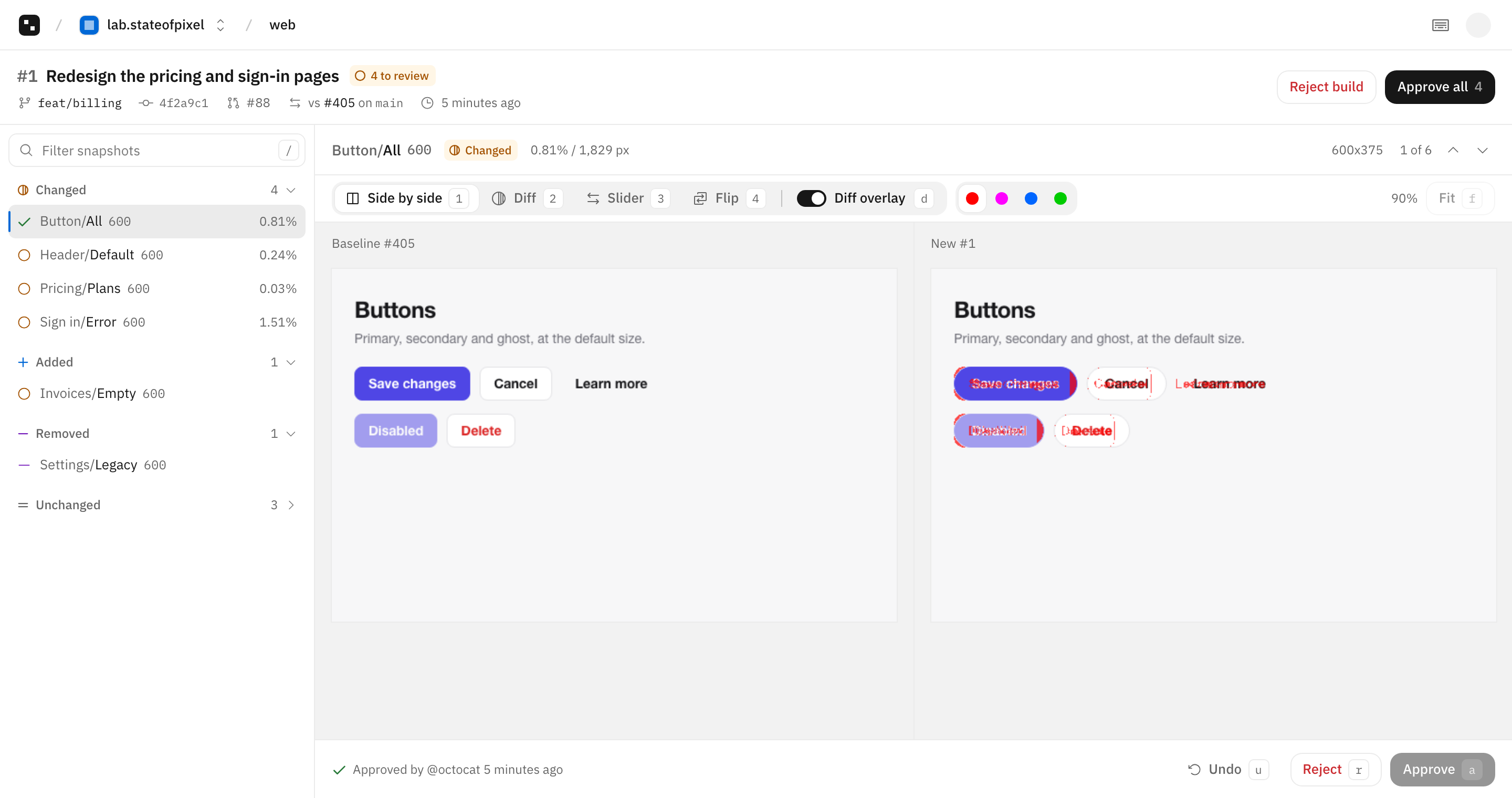
Each changed screenshot next to its baseline, with the changed pixels in green.- Four views. Side by side, diff, slider and flip.
- Keyboard first. j and k to move, a to approve, r to reject.
- One check. Green when every change is approved.
stateofpixel and Applitools, row by row.
Every row about Applitools links to the page it came from.ApplitoolsWhat you pay forStorage. Snapshots, builds and seats are free.Checkpoints a month, counted per page or per component.1Free plan10 GB stored. Snapshots are not charged.A 14-day trial. No free plan is listed.12At the plan limitWarns at 80%. After 14 days over, new images are not stored and the check passes with a note.Admins get an email. The contract allows throttling, overage fees, or ending the contract after three months over.34Who takes themYour CI.Applitools' Ultrafast Grid, from the DOM your test captures.5Where they are comparedYour CI. Only the images upload.Applitools' cloud, with Visual AI.5First paid plan$15 a month for 25 GB.Starter, $667 a month billed yearly, for 1,000 page or 100,000 component checkpoints. Higher plans are priced by sales.1SeatsNone. Access comes from GitHub roles.Unlimited users.1BrowsersWhatever your CI runs.Chrome, Firefox, Safari, Edge and Internet Explorer, plus emulated Android and simulated iOS devices.6Test runnersPlaywright, Storybook, or any tool that writes PNG files.Playwright, Cypress, Selenium, Storybook, Appium, WebdriverIO and more.7Git hostsGitHub.GitHub, GitLab, Bitbucket and Azure DevOps.89Build historyDefault branch builds kept. Pull request builds 60 days after close, 7 to 365 days.6 months on Starter, 12 months on Enterprise.4Open sourceYes, MIT licensed.No. The SDKs use a proprietary license.1011Where Applitools is ahead.
We skip some features on purpose. If you need one of these, choose Applitools.Visual AI match levelsLayout and Ignore Colors match levels skip content or color changes, for a whole image or a region. stateofpixel compares pixels with a color threshold.Root cause analysisEyes stores the DOM and CSS with each checkpoint and shows which ones changed. stateofpixel stores the images and their metadata.Browsers you don't runApplitools renders Safari, Edge and mobile devices for you. With stateofpixel, your CI renders every browser you want to compare.GitLab, Bitbucket and Azure DevOpsApplitools works with all three. stateofpixel works with GitHub only.Switch in one pull request.
Keep your tests. Change the step that sends screenshots to Applitools. The moving guide has the details.- 1Install the GitHub AppPick the repositories. On GitHub Actions there is no token to copy.
- 2Replace the Eyes stepStorybook stories are captured at each width you list. In Playwright tests, replace eyes.check() with snapshot().
- 3Merge to mainThat build becomes the baseline. There is nothing to export from Applitools.
Before
steps:
  - run: npm ci
  - run: npx eyes-storybook
    env:
      APPLITOOLS_API_KEY: ${{ secrets.APPLITOOLS_API_KEY }}
After
permissions:
  contents: read
  id-token: write

steps:
  - run: npm ci
  - run: npx storybook build
  - run: npx stateofpixel storybook storybook-static --viewports 375,1280
Questions.
What to know before you move from Applitools.Does Applitools have a free plan?
Applitools lists a 14-day trial. stateofpixel is free up to 10 GB stored, with no time limit.
Does stateofpixel use AI to compare?
No. It compares pixels and ignores color differences under a threshold you set per project or per run. Most noise is fixed where the screenshot is taken, see Stable screenshots in the docs.
Can I keep Cypress or Selenium tests?
Yes. Save screenshots to a folder and run stateofpixel upload on it. Cypress has its own guide in the docs.
Do I lose my Applitools baselines?
You start fresh. The first build on your default branch becomes the baseline, and pull requests compare against it from then on.
Sources
Read on 27 September 2026. Prices are list prices before tax. The stateofpixel column comes from our docs.