
Lost Pixel is closing. Your screenshots can move today.
The Lost Pixel team joined Figma and archived the repository. stateofpixel takes the same screenshots in your CI, keeps the baselines for you and sets the GitHub status.
Facts about Lost Pixel checked on 27 September 2026, with 9 sources.
One build, step by step.
300 stories at 3 viewports, run through Lost Pixel and through stateofpixel.
One build
One buildOne month
Lost Pixel
- 1The Lost Pixel image captures in your CI
- 2It compares in your CI
- 3Baselines are committed to git
- 4Or the Platform, which is shutting down
900countedEach screenshot in each build
stateofpixel
- 1Your tests take screenshots900 screenshots
- 2The CLI hashes and compares them on the runner900 hashes
- 3Only images we have not seen upload45 changed
- 4The review page and the GitHub check
0counted45 changed screenshots and their diffs stored
What changes when you switch.
The same pull request, reviewed with less in the way.
01MaintainedLost Pixel's last release was in November 2024. stateofpixel is in active development and reviews its own pull requests.
02Baselines out of your repositoryLost Pixel's open source mode commits baseline PNGs to git and has no review page. We pick the baseline from your git history and show every change on one page.
03A bill that follows storageLost Pixel Platform billed per screenshot. We bill for storage, and an unchanged screenshot is one hash.
What your reviewers get.
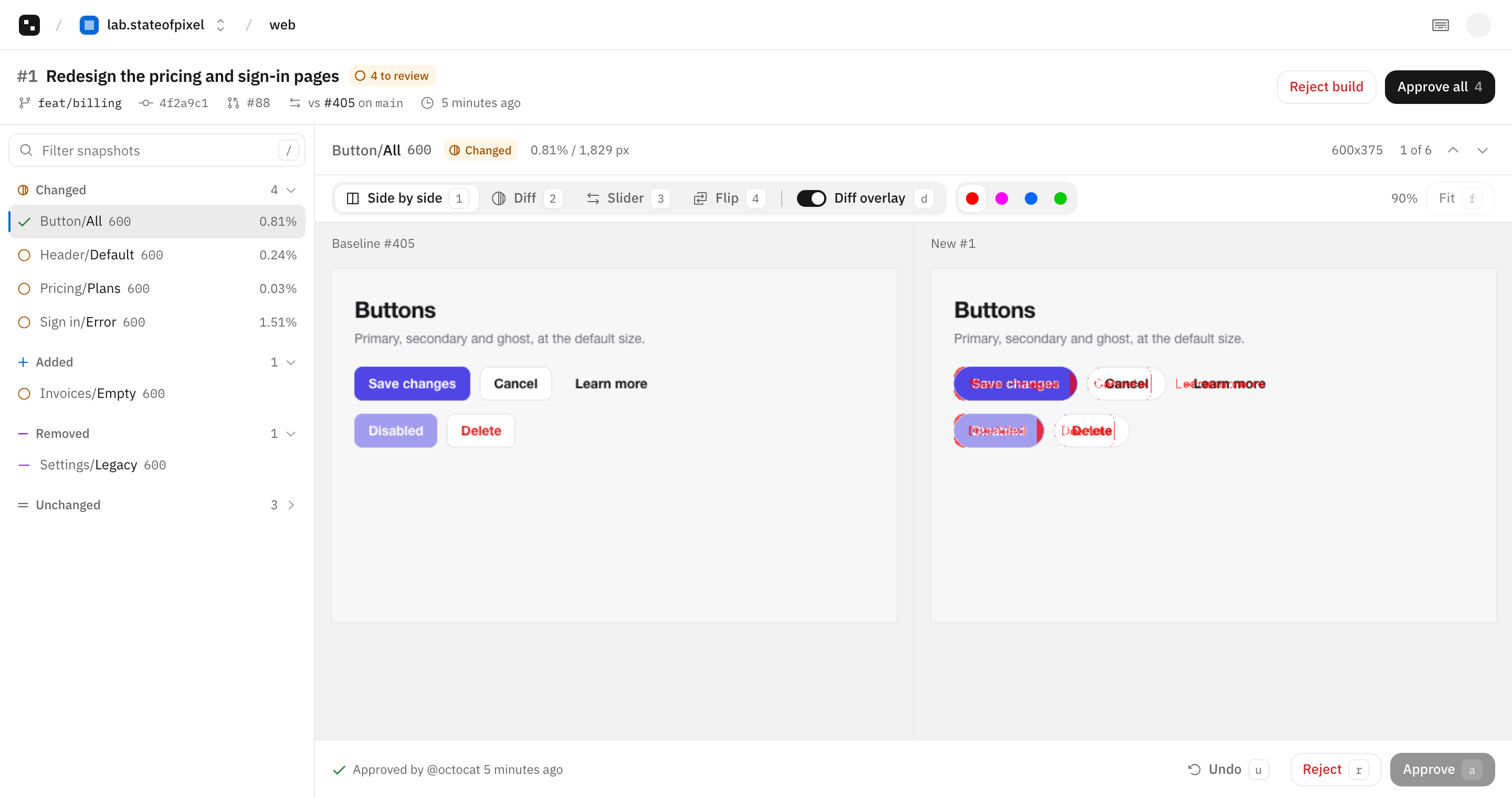
Each changed screenshot next to its baseline, with the changed pixels in magenta.
- Four views. Side by side, diff, slider and flip.
- Keyboard first. j and k to move, a to approve, r to reject.
- One check. Green when every change is approved.
stateofpixel and Lost Pixel, row by row.
Every row about Lost Pixel links to the page it came from.
Key rows5Pricing5Screenshots4Platform3All12
stateofpixelLost PixelWhat you pay forStorage. Snapshots, builds and seats are free.Screenshots a month.4Free plan10 GB stored. Snapshots are not charged.7,000 screenshots a month.4At the plan limitWarns at 80%. After 14 days over, new images are not stored and the check passes with a note.Not found in their docs.Who takes themYour CI.Your CI, in the Lost Pixel Docker image with Playwright.5Where they are comparedYour CI. Only the images upload.Your CI, with pixelmatch by default.6First paid plan$15 a month for 25 GB.Startup, $100 a month for 40,000, then $0.006 each.4SeatsNone. Access comes from GitHub roles.Unlimited collaborators on Free.4BrowsersWhatever your CI runs.Chromium, Firefox and WebKit.7Test runnersPlaywright, Storybook, or any tool that writes PNG files.Storybook, Ladle, Histoire, page URLs, or a folder.8Git hostsGitHub.GitHub.9Build historyDefault branch builds kept. Pull request builds 60 days after close, 7 to 365 days.Not found in their docs.Open sourceYes, MIT licensed.The engine is MIT licensed and archived. The review UI is Platform only.38
Lost PixelWhat you pay forStorage. Snapshots, builds and seats are free.Screenshots a month.4Free plan10 GB stored. Snapshots are not charged.7,000 screenshots a month.4At the plan limitWarns at 80%. After 14 days over, new images are not stored and the check passes with a note.Not found in their docs.Who takes themYour CI.Your CI, in the Lost Pixel Docker image with Playwright.5Where they are comparedYour CI. Only the images upload.Your CI, with pixelmatch by default.6First paid plan$15 a month for 25 GB.Startup, $100 a month for 40,000, then $0.006 each.4SeatsNone. Access comes from GitHub roles.Unlimited collaborators on Free.4BrowsersWhatever your CI runs.Chromium, Firefox and WebKit.7Test runnersPlaywright, Storybook, or any tool that writes PNG files.Storybook, Ladle, Histoire, page URLs, or a folder.8Git hostsGitHub.GitHub.9Build historyDefault branch builds kept. Pull request builds 60 days after close, 7 to 365 days.Not found in their docs.Open sourceYes, MIT licensed.The engine is MIT licensed and archived. The review UI is Platform only.38Where Lost Pixel is ahead.
We skip some features on purpose. If you need one of these, choose Lost Pixel.
Offline, with no serviceThe Lost Pixel engine is MIT licensed. It can keep comparing against baselines committed to your repository, with no account anywhere.Switch in one pull request.
Keep your tests. Change the step that sends screenshots to Lost Pixel. The moving guide has the details.
- 1Install the GitHub AppPick the repositories. On GitHub Actions there is no token to copy.
- 2Replace the Lost Pixel stepStorybook stories are captured at each width you list. For custom shots, upload the folder your tests write.
- 3Delete .lostpixel/baselineIf you committed baselines, remove them. The first build on your default branch becomes the baseline.
Before
steps:
  - run: npm run build-storybook
  - name: Lost Pixel
    uses: lost-pixel/lost-pixel@v3.22.0
    env:
      LOST_PIXEL_API_KEY: ${{ secrets.LOST_PIXEL_API_KEY }}
After
permissions:
  contents: read
  id-token: write

steps:
  - run: npm run build-storybook
  - run: npx stateofpixel storybook storybook-static --viewports 375,1280
Questions.
What to know before you move from Lost Pixel.
Yes. On 22 April 2026 the team announced they are joining Figma and sunsetting Lost Pixel. The GitHub repository is archived.
Storybook works directly with stateofpixel storybook. For Ladle, Histoire or pages, save screenshots with Playwright and upload the folder.
No. stateofpixel stores the images and picks each baseline from your git history. Delete .lostpixel/baseline from your repository after you switch.
Sources
Read on 27 September 2026. Prices are list prices before tax. The stateofpixel column comes from our docs.