vs Compare / Argos
Same idea as Argos. A different bill.
Both take screenshots in your CI. Argos compares them on its servers and counts every screenshot in a build. stateofpixel compares on your runner, uploads only images it has not seen, and bills for storage.
Facts about Argos checked on 27 September 2026, with 8 sources.
A month of visual tests
300 stories, 3 viewports, 400 builds, 360,000 screenshots
- stateofpixelFree, 5.5 GB stored$0
- ArgosPro + 325,000 extra$1,400
Where the screenshots come from. That one choice decides what can drift, and what you are billed for.
ArgosBilled per screenshot- 1Your tests take screenshots
- 2The SDK or CLI uploads the build
- 3Argos compares against the baseline
- 4Argos sets the commit status
- 1Your tests take screenshots
- 2The CLI hashes and compares them on the runner
- 3Only images we have not seen upload
- 4The review page and the GitHub check
What changes when you switch. The same pull request, reviewed with less in the way.
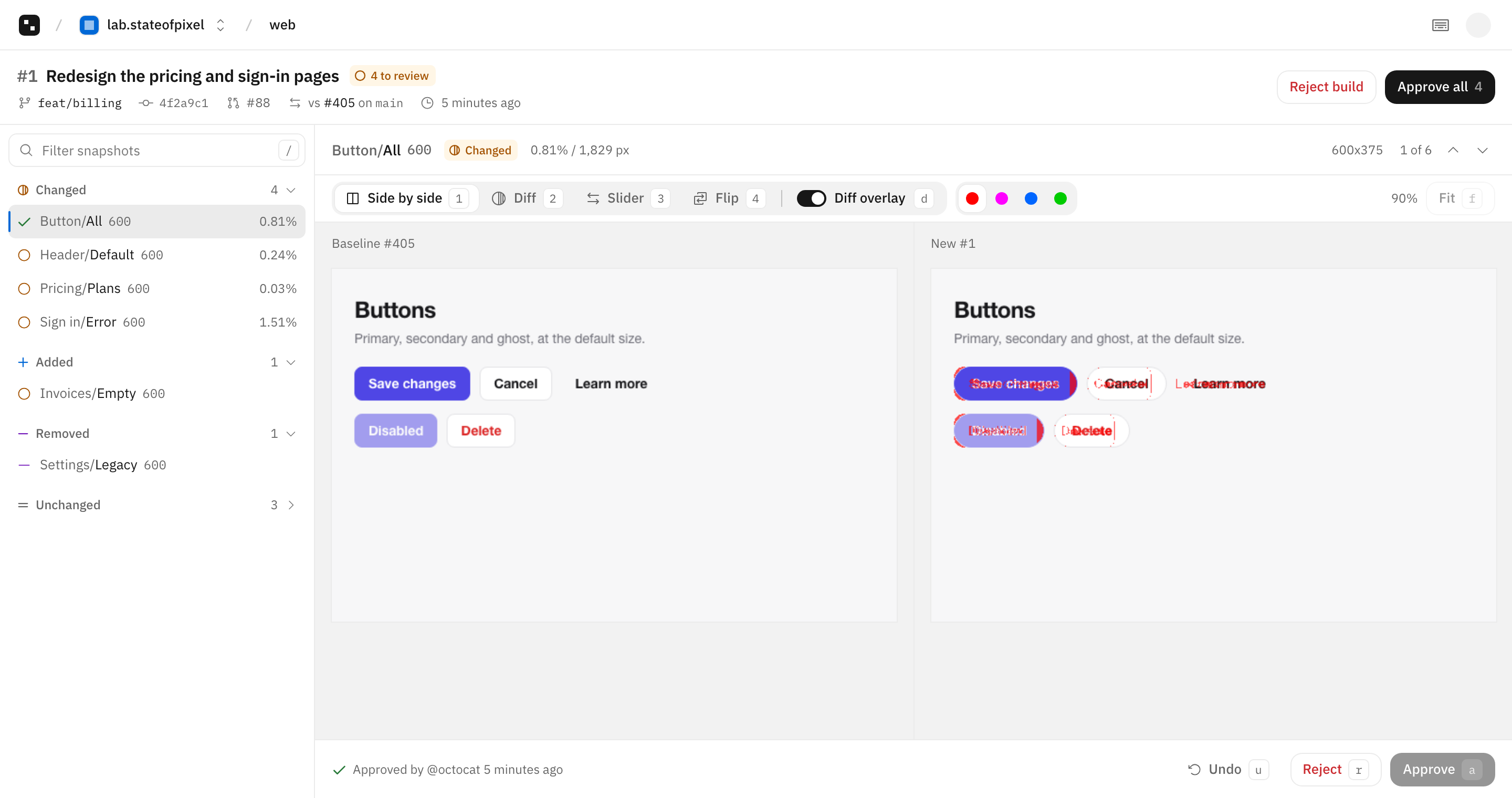
What your reviewers get. Each changed screenshot next to its baseline, with the changed pixels in red.
- Four views. Side by side, diff, slider and flip.
- Keyboard first. j and k to move, a to approve, r to reject.
- One check. Green when every change is approved.
Price it for your suite. Move the sliders. Every tool here bills for this many screenshots a month, except stateofpixel.
Screenshots a month360,000
ArgosPro + 325,000 extra$1,400 /mo$16,800 a year less than Argos.
Screenshots are stories x viewports x browsers x builds. For stateofpixel, 5% of screenshots change per build at 80 KB each, and pull request images are kept 60 days. The cheapest list plan for each tool, before tax, from Argos pricing on 27 September 2026. Argos charges $0.0015 for extra Storybook screenshots.
Side by side. Every row about Argos links to the page it came from.
ArgosPricing
Where Argos is ahead. We skip some features on purpose. If you need one of these, choose Argos.
Open sourceArgos is MIT licensed. stateofpixel is closed source for now.GitLabArgos supports GitLab. stateofpixel works with GitHub only.Flaky tests and PR commentsArgos ranks tests by flakiness and comments on the pull request. stateofpixel has neither yet.An SDK per frameworkArgos has SDKs for Cypress, WebdriverIO and Puppeteer. stateofpixel takes the PNG files they write.Switch in one pull request. Keep your tests. Change the step that sends screenshots to Argos.
- 1Install the GitHub AppPick the repositories. On GitHub Actions there is no token to copy.
- 2Replace the upload stepPoint it at the same folder. Folder paths become snapshot names.
- 3Merge to mainThat build becomes the baseline, and pull requests compare against it.
Before
steps:
  - run: npm test
  - name: Upload screenshots to Argos
    run: npm exec -- argos upload ./screenshots
    env:
      ARGOS_TOKEN: ${{ secrets.ARGOS_TOKEN }}
After
permissions:
  id-token: write

steps:
  - run: npm test
  - run: npx stateofpixel upload screenshots
Questions. What to know before you move from Argos.
How is stateofpixel different from Argos?
Both review screenshots from your CI. Argos compares them on its servers and bills per screenshot. stateofpixel compares on your runner, uploads only new images and bills for the storage they use.
Does sharding work the same way?
Yes. Each shard uploads its part, and the check reports once. Use --shard 2/4, or --shard auto with a finalize step.
I use the Argos Playwright SDK. What changes?
Replace argosScreenshot() with snapshot() from stateofpixel/playwright, and the Argos reporter with stateofpixel/playwright.
What happens at the storage limit?
The CLI warns at 80%. After 14 days over the limit, new images are not stored and the check passes with a note, so CI keeps passing.
Sources
Read on 27 September 2026. Prices are list prices before tax. The stateofpixel column comes from our docs.
Every pixel, reviewed.
Nothing ships by surprise.